Showing posts with label 6510. Show all posts

Saturday, August 15, 2026

Touch points and buttons on M5Core 2" displays, Tab 5" display, and Sunton 7" display for keyboard emulation


I have targeted the following M5 Stack models with my C64/C128/Vic-20/Apple 1 emulator:

(Even though I have targeted other boards, I had only implemented touch on the CoreS3)

The primary reason for targeting these boards was the common 2" 320x240 display perfect for most C64 emulation, and the availability of a wristband that works with Core2 and CoreS3 (it works with the Fire if and only if you never need to charge the battery - not aware of a universe where that works out long term).

[aside... Originally I had supported the M5 Core Basic, but without PSRAM, it was difficult to support the different computer models that currently load into that memory.  So M5 Core BASIC was dropped after its initial development.]

The Basic and Fire have three UI hardware buttons.   The Core2 has three virtual touchscreen buttons (touchscreen expands farther down from the LCD screen to allow for capacitive touch button points, and the M5 library abstracts them similar to physical buttons, so your code doesn't even have to know the difference).  The CoreS3 has no UI buttons, but I've manually implemented virtual touch screen buttons at the bottom of the screen.   From left to right the buttons are known to M5 as A, B, and C.

So button support for Basic, Fire, and Core2 was straightforward.

  • press Button A: Cursor UP
  • press Button B: RETURN
  • press Button C: Cursor Down
With hold functionality as well.
  • hold Button A: toggle computer model (C64, C128, Vic-20, Apple 1, repeats)
  • hold Button B: LOAD"*",8 / RUN for Commodore, snapshot system for Apple 1
  • hold Button C: STOP
Thus, one can demonstrate the emulator loading a menu of programs, scrolling though the listing, and choosing one.  And toggle between the emulators.   The Apple 1 snapshot system allows choosing a snapshot and loading or saving it.

I support other hardware targets, and I have BLE pairing functionality.  So I am thinking of expanding support of the virtual buttons, including more virtual buttons, and providing 8-position joystick inputs (and button) too.  But for now, here is the documentation for the existing buttons.

And then just like that, the CoreS3, Tab5, and Sunton 7" now have more touch points implemented for their capacitive touch screens to allow for more virtual keys.


Friday, November 3, 2023

When Emulation goes wrong

My name is Dave and I'm a software developer.

I both create and fix defects in code that I've written.   Hopefully I find the bugs quickly, but sometimes they linger for weeks, months, years, before being discovered or reproduced.

My story is not unique.  It is difficult or impossible to write software without introducing defects.  Computers are complex systems, but very obedient.   They do exactly as they are told if you know how to speak their language, precisely, without misunderstanding or any inaccuracies.  Problems can crop up if the developer didn't understand the system requirements in the first place (design/requirements issues), didn't thoroughly test all inputs and code paths, didn't understand concurrency issues, made assumptions, or makes the simplest of mistakes.   As humans, we learn to overlook some inconsistencies, mistakes of others, so as to not disrupt the social norm.  But with most of the languages we use with computers (Assembly, C, C++, C#, Java, etc.) many of these don't allow for the slightest of change. Some scripting languages (HTML, JavaScript, CSS, etc.) allow for some variance, but still are expecting a valid input.

Am I making an excuse for my mistakes?  No, but explaining that they will exist.  I wrote a limited Commodore/6502 emulator a while back and have ported it to various platforms with demonstrable results.  I can run Commodore 64 and related systems at the BASIC prompt and it appears to mostly function normally.

Then I ported to Vic-20 including adding full-screen editing support and conversion from Commodore 64 key scans to Vic-20 key scans.   And it did not work.   But I swore up and down that I did everything correctly (ha!).  Then dove in deeper to see what was different.   Turned out the ROL ABS and ASL ABS instructions were doing the value shift but not storing the result in memory.  A normal 6502 knows how to do this just fine, but the emulator needed to accurately replicate this behavior to be correct.  The fix was to store the result at the absolute 16-bit address.

My first mistake was that I never performed a formal test of the instruction set of the emulated 6502.  I knew they existed, but when bringing up the C64 I only spot checked a few instructions, and even compared traces between Vice and my emulator to note differences, and correct the emulation in a few places.  (There's a reason my trace looks exactly like that from Vice -- so the comparison would be easy!)  But once the system appeared to function correctly, I stopped testing.

Fast forward over 3 years later, and I know that some of my systems are not 100% correct.  The effort I had brushed away came back to nag me.  I really should test better.  I have a saying that if it's not tested, it's not working.  And I had ignored that saying.  But I buckled down and did the effort of running a 6502 test suite against my emulator.  And sure enough there were problems.

And since I have multiple emulator instances, the problems were slightly different, as I hadn't applied fixes consistently between all of them (still have missed a few at date of this article!  STM32, mbed, TypeScript still have known bugs). [update 2023-11-05: TypeScript emulator updated with fixes]

Here are the instructions and features of the 6502 that required fixes in my emulator:

ROL (absolute address)

LSR (absolute address)

PHP (B flag)

PLP (B flag)

IRQ (push processor state without B flag) 

(zp,X) indirect zero page indexed by X addressing not truncated to byte address when overlap page, affecting both load value and store value

SBC resulting in a negative result when in decimal mode

Many changes are now checked in for C++, C#, Arduino, M5, Teensy and related projects.

There are remaining bugs in emulation, probably closer to individual system systems outside the 6502 emulation.  A few issues can be reproduced on demand, so I can tackle those next.

But the 6502 emulation should be good, at least as much as it has been tested.

Thanks to Klaus Dormann for these 6502 tests.

Reference: 6502_65C02_functional_tests

Friday, June 30, 2023

Extremely small emulated C64 and C128


This "portable" Commodore 64 and 128 emulator (m5 source code branch) is my work in progress, one in a series of minimalist emulators ported to different hardware targets. Only text (on LCD) with background, foreground, border colors, keyboard entry via USB serial tethered web browser, and general 6502/6510 and C64 memory management emulation is present (no, won't play games, make sound, or do bitmapped graphics) with some D64 emulation [added 7/2/2023].

(Update 7/28/2023) Now with GO 128 command.

GO 128 command


Even my son asked, "Why do you need to do that?"  Well, he has a point.  I wanted a C64 that fit in my pocket or even on my wrist.  And targeting new hardware platforms with my emulator is part of my hobby.

How does it work?  Check out my highly technical drawing.

Now I already here you asking why I didn't connect Bluetooth to the M5Core, because certainly it has Bluetooth as well, and why didn't I use a USB keyboard connected to CoreS3, because it includes USB Host.  But I've had trouble tracking down examples of HID Host examples for M5; client examples are prevalent, but host?

Pictured here is a phone is running Chrome with a custom copy of the html/javascript keyboard adapter including web-serial-polyfill because mobile Chrome doesn't directly include Serial API support.  A Palm Pilot foldable keyboard has a Bluetooth adapter, paired with the phone.   HID keystrokes are captured by the web page, converted to C64 key scan codes, and a list of the active key scan codes (or 64 when keys released) is sent over USB Serial to the M5Core device which is running the C64 ROMs which are tricked into thinking a real keyboard is attached; keystrokes are processed by the C64 KERNAL IRQ as normal.

The M5Core is being powered by the phone.   Why M5Core?  Because it's a polished packaged solution.

Yeah, we could just run a Commodore 64 emulator on the phone, but this way, I could have complete control over the keyboard emulation, what keys are present, how CTRL and Commodore keys work, etc.  And it's just because I can, not because I should.

Why the Palm Keyboard?  Because it folds in my pocket!  And because I had one from back in the day.  Any keyboard you can attach to a phone or computer should work.  And this Bluetooth adapter just makes it so cool, and easier than a tethered keyboard.

The next step is to merge this solution with my Commodore 128 keyboard adapter to completely reject the portability feature.   That would look really cool hooked up to my phone!  Update (7/31/2023): check out YouTube for connection from ItsyBitsy/keyboard to Core Port.A.


C128 Keyboard Adapter Breadboarded Prototype


7/23/2023: PCB prototype keyboard adapter w/ ItsyBitsy

I am excited about my nonsense crazy adventures. Even if only I enjoy them.

=====

Update (7/2/2023): D64 support is currently working with Core2 only (Basic Core doesn't usually have the additional SPI RAM, but not yet sure why CoreS3 is failing to attach SD).

Update (7/3/2023): Got CoreS3 working with SD switching header to M5Unified.h for that target (was M5Cores3.h) and adding special definition, override logic for SD_CS to use GPIO_NUM_4 instead of default.  See updates to M5Core.h.

Update (7/28/2023): Commodore 128D extended keyboard working with UART connection to Port.A of Core, and Commodore 128 emulation is ported as well.

=====


Saturday, May 14, 2022

GO 128 enhancement for Commodore


One wonderful feature of the Commodore 128 was its compatibility with the Commodore 64.  It was an evolution of the Commodore 64 and still supported all the software and hardware from before.  For me it was a no-brainer to buy.  80 columns, plus new features, plus CP/M.   Adding a mouse, GEOS 128, REU 512K, and 3.5" floppy, and I thought it was the best place to be this side of heaven.

There were multiple ways to go into Commodore 64 mode.

  1. Start with a Commodore 64 cartridge
  2. Boot/reset with the Commodore key held
  3. Commodore 128 boot disk that switched to Commodore 64 mode
  4. Switch MMU to Commodore 64 mode
  5. GO 64 command
But the only way to get back into Commodore 128 BASIC 7.0 was to reset the system.


Fast forward a few decades or so, and now we can add GO commands to the other BASIC systems to switch between them.  Links: cross-platform source, Windows binary release.

How does it work?  This is emulation.  Sorry purists.   The Commodore 128 MMU was built so there is no going back out of C64 mode.  This was by design to keep 64 mode on the 128 very close to 100% compatibility.  But emulation?  Anything goes.  The GO command is hooked, the argument is checked for a number, and if the number is right, it goes to that Commodore model by restarting the emulation for that system.  And thus, when running the BASIC for one system, can quickly switch to another other system (or even reset the system) using the GO command.  It even prompts for amount of RAM to allocate (except 128 is fixed at 128).

PET 2001 2K to 64K supported 
Vic-20 5K to 40K supported in hardware supported increments, not all available to BASIC
64 RAM 3K to 64K supported not all available to BASIC
Commodore 16 and Plus/4 support 16K, 32K, or 64K
Commodore 128 fixed at 128K (KERNAL does not do RAM test) 

Limitations?  Oh, sorry.  This emulator is text only.  No full screen editor.  Doh!   No screen pokes either (well not displayed).  [Update 6/2021:] PETSCII and commodore graphics characters supported with third party font.  Does support console history editor on Windows.   Linux and MAC builds (you can build from my open source project) provide only simple line editing capability.   Does provide accurate 6502/6510/8502 emulation, RAM banking, etc. according to the platform.   So pop into the MONITOR on C128 or C16, Plus/4, or SUPERMON on other platforms to write and edit machine code.   And because using console window, the text display size is not as limited, 88 columns for Vic-20 and 160 columns for C128.


Save and Load from .PRG is supported as well (except PET at this time, some other limitations).  Disk device is ignored, so defaults to local file system.  Even use absolute and relative paths.

So for simple programs, and just playing around in BASIC, it's not too bad.   Text background and foreground color for Vic-20 is enabled because that color palate is more compatible with the Windows console default colors.  Reverse text should work on all systems.  Home, clear, cursor positioning may work in programs only, not for editing.


Now prompts for RAM size going to 64


Going to Vic-20 from 64


Going to PET 2001 from Vic-20


Going to Plus/4 from Vic-20

Going to Commodore 16 from Plus/4


Going to 128 from Commodore 16

Resizable text console - 132x50 text screen on Commodore 128

Bil Herd, Ted/C128 hardware design project lead (left) and Dave Van Wagner, geek (right)


Links: 

Thursday, August 6, 2020

Commodore 64 BASIC CRUNCH Routine Commented

The disassembled code here is from
Commodore 64 ROM.

The comments and intermediate labels
are mine.

Together they are useful.

Placing this here as is for reference.
I found this exercise necessary when
implementing my hires extensions for C64
including a patch of this routine.

        ; C64 crunch is A57C-A612
        ; C64 tokens are A09E-A19D
crunch ; from C64 ROM
       ; INPUT: PETASCII of entered line is at buffer $0200, ending with #$00 null character
       ; OUTPUT: tokenizes in place entire line, ending line with #$00 null character
       ; HINT: because of tokens, result is smaller than original so can modify in place
         LDX $7A        ; source buffer index
         LDY #$04       ; storage index starts at 4 (4+$1FB+1 = $200)
         STY $0F        ; set not DATA flag (4=NOT, 0=DATA)
.go      LDA $0200,X    ; retrieve next character from input buffer
         BPL .lowch     ; branch if 00-7F
         CMP #$FF       ; PI?
         BEQ .store     ; branch if PI, already tokenized
         INX            ; advance source index
         BNE .go        ; always skip initial character 80-FE, as X shouldn't ever wrap to 0
.lowch   CMP #$20       ; compare to ASCII space
         BEQ .store     ; branch if space, store literal
         STA $08        ; no, store character, non-zero = not REMark
         CMP #$22       ; compare to ASCII quote
         BEQ .literal   ; branch if string, store literal characters instead of matchng tokens
         BIT $0F        ; test if in DATA statement
         BVS .store     ; branch if in DATA statement, store literal characters instead of matching tokens
         CMP #$3F       ; compare to ASCII question mark
         BNE .chkzero   ; no, skip next part
         LDA #$99       ; replace question mark with token PRINT
         BNE .store     ; unconditional branch, store token
.chkzero CMP #$30       ; compare to ASCII zero digit
         BCC .scantbl   ; branch if less
         CMP #$3C       ; compare to ASCII less than
         BCC .store     ; branch if less, so branch if numeric or colon or semi-colon, store literal character
.scantbl STY $71        ; save storage offset index
         LDY #$00       ; initialize token table byte index to zero
         STY $0B        ; initialize token number to zero
         DEY            ; cancel out the next increment for loop beginning with decrement
         STX $7A        ; save source index
         DEX            ; cancel out the next increment for loop beginning with decrement
.advance INY            ; advance token table index
         INX            ; advance source index
.scanch  LDA $0200,X    ; retrieve character from buffer
         SEC            ; prepare for subtraction
         SBC $A09E,Y    ; compare to Commodore token table
         BEQ .advance   ; branch if character match, look for more matches
         CMP #$80       ; end of token?
         BNE .scannxt   ; branch if not end of token, mismatch, so get ready to check next token
         ORA $0B        ; match! combine zero based token number with $80 high bit set for storage
.storaty LDY $71        ; retrive storage offset index
.store   INX            ; advance input index
         INY            ; advance output index
         STA $01FB,Y    ; store token or character
         LDA $01FB,Y    ; set Z flag if end of line
         BEQ .endline   ; branch if end of line, finish up
         SEC            ; prepare for subtraction
         SBC #$3A       ; subtract ASCII colon
         BEQ .setf      ; branch if colon
         CMP #$49       ; DATA?
         BNE .skipset   ; skip setting flag if not DATA
.setf    STA $0F        ; $49 if DATA, or $00 if colon
.skipset SEC            ; prepare for subtraction
         SBC #$55       ; REM?
         BNE .go        ; branch if not REM to get next character
         STA $08        ; store flag zero = REM
.litloop LDA $0200,X    ; retrieve next character from input
         BEQ .store     ; branch if end of line
         CMP $08        ; compare to token that got us in this loop (e.g. 0x22 quote), or 0x00 (REM)
         BEQ .store     ; branch if REMark end of line
.literal INY            ; advance destination index
         STA $01FB,Y    ; store in buffer
         INX            ; advance source index
         BNE .litloop   ; repeat getting next character
.scannxt LDX $7A        ; retrieve source index
         INC $0B        ; advance token number
.endtok  INY            ; advance destination index
         LDA $A09D,Y    ; retrieve character from token table
         BPL .endtok    ; loop until find end of token
         LDA $A09E,Y    ; retrieve next character from token table
         BNE .scanch    ; branch if not end of token table
         LDA $0200,X    ; re-retrieve character from input buffer
         BPL .storaty   ; branch if character 00-7F, should be if got here, no token match
.endline STA $01FD,Y    ; store end of line nul character $00
         DEC $7B        ; update TXTPTR
         LDA #$FF       ;  to point to
         STA $7A        ;  $01FF
crunch_finish:
         RTS            ; done

Monday, July 13, 2020

Commodore 64 running in web browser

Open full size window: c64emu.davevw.com

  • Coded in TypeScript(/JavaScript) with some HTML of course
  • Portable (got a web browser right?)
  • Keyboard driver works best with Firefox
  • Works on Mobile and TV too (click on screen for configuration, help)
  • F9 to toggle Help
  • Recommend use wired or bluetooth keyboard instead of onscreen keyboard
  • This is based on my earlier efforts (see previous posts)
I coded this as a learning experience with TypeScript.  Go ahead and try it out!

Included features:
✓ 6502 Emulation, machine code
✓ Commodore 64 Text Screen
✓ Commodore Fonts: Uppercase/Graphics, Lowercase/Uppercase
✓ Commodore Colors: Foreground, Background, Border
✓ Commodore BASIC v2 (Microsoft)
✓ 64K RAM
✓ 20K ROM
✓ Attach D64 image
✓ Load directory from D64
✓ Restart with PRG image
✓ JavaScript speedloader to bypass slow C64 disk access
✓ Save/Download PRG
✓ Great wired/wireless keyboard support
✓ Keyboard scan code support - press/release, multiple keys support, separate left/right Shift
✓ Standard to Commodore keyboard symbolic mapping, add/remove Shift
✓ Special key mappings: Stop, Home, Restore, F1-F8, Ctrl, Commodore
✓ Mobile/TV browser keyboard support (but minimal)
✓ Clipboard paste support
✓ IRQ 60 times per second
✓ NMI on Restore key
✓ Works best with Firefox

Missing features or limitations:
✗ 6502 undocumented instructions
✗ Accurate, regulated instruction timing
✗ 6502 emulation battery drain (one thread always running 100%, no idle sleep)
✗ VIC-II register support
✗ Device register support
✗ Programmable timers
✗ Serial Port - User Port
✗ High Resolution 320x200 and 160x200 graphics
✗ Multi-color text mode
✗ Programmable characters
✗ Sprites
✗ Cartridges
✗ Joysticks, Paddles
✗ Printer
✗ Cassette Tape
✗ Save to D64
✗ SEQ, RND, etc. files
✗ LOAD PRG from running program
✗ Positional keyboard mapping
✗ On-screen keyboard
✗ Clipboard copy
✗ A few graphic character key strokes (punctuation keys) may not be mapped yet
✗ Known issues with Google Chrome

Sunday, April 12, 2020

Commodore 64 for STM32F429 Discovery board

So here is a Commodore 64 emulator I built for STM32F429 Discovery board:


Yeah, the LCD is tiny at 2.4", and the emulation runs about 15% slower than an NTSC C64.  But it's running on a small embedded board that's available for under $30 US (DigiKey, Mouser, ...) including mounted LCD display and USB OTG jack.  Just add keyboard, OTG USB adapter, and power supply.

This is a port of my portable C64/6502 emulator for terminal console, which was a port of my Commodore/6502 emulator for Windows Console.   But this time, I dropped the console part, and went for real video (LCD) and USB keyboard support.   Hello PETSCII!

Keyboard mapping (showing my Dell keyboard):
   STOP(ESC) F1 F2 F3 F4 F5 F6 F7 F8            Restore(PrtScr/SysRq) Run/Stop(Pause/Break)
             1! 2@ 3# 4$ 5% 6^ 7& 8* 9( 0) -_ += Del/Ins(Back)    Ins Hme/Clr     / * -
   Ctrl(Tab) Q  W  E  R  T  Y  U  I  O  P  [  ]  £ (\)            Del           7 8 9 +
             A  S  D  F  G  H  J  K  L  ;: '" Return(ENTER)                     4 5 6
   LShift    Z  X  C  V  B  N  M  ,< .> /?  RShift                     Up       1 2 3
   C=(Ctrl)           SPACEBAR              C=(Ctrl)              Lft Down Rt   0 .   Enter

Features:
  • 320x200 text screen on graphics LCD, with top/bottom border.
  • USB Keyboard (e.g. PC-103) support (symbolic, not positional)
    • Tab maps to C64 Ctrl key
    • Ctlr maps to C64 Commodore key
    • Esc key maps to C64 RUN/STOP key
    • PrtScr/SysRq maps to C64 RESTORE key (supports STOP+RESTORE)
    • PgUp also maps to C64 RESTORE key
  • Full 6502 emulation.  Go ahead, run some machine language on it.
  • Commodore character set
  • Text video at $0400 (address 1024)
  • Text color at $D800 (address 55296)
  • Keyboard scan by writing to $DC00, reading from $DC01
  • Full 64K RAM.  Update 2020-04-14: RAM/ROM/IO/Charset banking is implemented!  And 1K color nybbles
  • 1/60 second IRQ.  So we've got the software clock: TI, TI$
  • Upper/lower case switch ($D018), and reverse characters.
  • Border color ($D020) and background color ($D021).
Limitations:
  • Approximately 85% cpu speed of a real C64
  • No NMI.  No Restore key.  Update 2020-04-15: implemented, see keyboard above.
  • No other device support.  No tape, no disk, no serial, no cartridges, no joysticks, no printer.
  • VIC-II support is limited to getting system booted.
    • No full register support.
    • Text address can't be moved.
    • No graphics support.
    • No programmable characters.
    • No raster interrupts.
    • No sprites.
    • No left/right side border displayed.  Ran out of pixels.
  • No CIA1/CIA2 (except for keyboard data ports, but no data direction registers)
  • No SID.
  • In progress.  There are bugs lurking (for example, the IRQ and USB keyboard stops working exactly at 35 minutes, 38 seconds from start, maybe a resource leak in third party libraries, so we'll call that time limited I guess)
  • Keyboard support may need tweaks for more complete PETSCII key support
  • No CAPS LOCK or SHIFT LOCK supported
  • Doesn't utilize full capabilities of the STM32F429 MCU and discovery board components including 2.0MB of Flash (uses 110KB), 256KB of RAM (uses 83KB), 8MB SDRAM, motion sensor, user leds, user button, or other expansion capabilities.  Opportunity awaits!
Links:
Credit:  

Monday, March 30, 2020

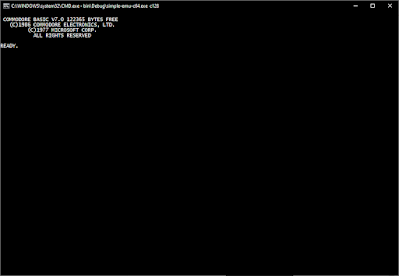
6502 emulator for terminal, Commodore Edition

(Update: Commodore 64, 128, VIC-20, PET, and Commodore 16, Plus/4 aka TED series)

This is a simple 6502 emulator.  And a very simple Commodore emulator.  If you like console windows and command lines, this may be your emulator, especially if you like both 6502 and BASIC.  And if you prefer C#, check out the emulator sources (link at end).


Simple

How simple is it?  It is so simple!  It turns out you can craft a 6502 emulator, hook just the character in/out routines, do a little memory management, feed it Commodore ROMs, and you've got a retro computer in a terminal (Windows Console in this case).  If you implement the 6502 accurate enough, it just works.

Commodore 64 and VIC-20 ROMs don't really care if there is any real hardware I/O available or not.  All memory is zeroed to begin with, and I've treated the I/O areas as RAM so the I/O values can be retrieved.  And it seems to work for booting the system.

The only two kernel JMP table entries patches are CHRIN ($FFCF) and CHROUT ($FFD2).  By intercepting CHRIN completely, the screen editor is bypassed, but by allowing the CHROUT to continue, screen memory is updated simultaneously to the Windows console.  Note that this emulation has lazily not implemented hooks to writes to screen memory, though you are free to implement this as you desire adding code to the SetMemory() method within the C64Emu, Vic20Emu, or other appropriate class.

The goal was to access the BASIC command line.  And using the Windows Console ReadLine(), we now get those history and editing features instead:  Home, End, Del, Backspace, Cursor Up/Down/Left/Right, etc.

If you're itching for some simple BASIC command line, including entering programs line by line, you are all set.  Until you want to SAVE, LOAD, VERIFY.  Sorry, not implemented (yet?  use the Windows clipboard for now).   Full LOAD/SAVE implementation exercise left to the reader.  ;-)   Yet, since it is a faithful 6502 emulator, if you can get your own machine code loaded, you can run that too.

Commodore PET 2001 series, Commodore 16 and Plus/4 (TED) emulators are available too, required some additional changes including RAM banking for the TED series.

Update (2020-04-14) Commodore 64 now includes banking support for RAM/ROM switching.

Update (2020-05-4) Commodore 128 support added including MMU support for banking, etc., yet skips the Z80 support.

Want to work with another system like an Atari 400/800 series, Apple II, BBC Micro, Atari 2600 cartridge, or NES ROM?  I'm not going to stop you.  The 6502 emulation is here to use.  Though the video game systems probably won't work well in a console.  Not sure what the minimal emulation is required to get BASIC working on the others.


Limitations:

  • Only keyboard/console I/O.  No text pokes, no graphics.  Just stdio.  No asynchronous input (GET K$), but INPUT S$ works.  No special Commodore keys, e.g. function keys, cursor keys, color keys, STOP/RESTORE, etc.  (Could improve this.)
  • No keyboard color switching.  No border or border color.  Text and background colors are implemented, but disabled by default because mapping to the standard console colors results in some fairly horrible color combinations.
  • No screen editing (gasp!) Just short and sweet for running C64 BASIC in terminal/console window via 6502 chip emulation in software
  • PETSCII graphic characters supported only as an option if you include petscii on the command line and use a third-party font C64 Pro Mono (note: has own individual license restrictions), otherwise without PETSCII only supports printables CHR$(32) to CHR$(126).  But does support CHR$(147) for clear screen.  Now also supports Home/Left/Right/Up/Down output characters too.
  • No timers.  No interrupts except BRK.  No NMI/RESTORE key.  No STOP key.
  • No loading or saving of files implemented (but Windows clipboard works!)
  • No cartridges.
  • No joysticks.
  • No sprites.
  • No graphics (you know this is a terminal/console window right?)
  • Yikes, that's a lot of no.  Seriously, it is a simple emulator.  Emphasis on simple.
  • Lightly tested.  Bugs are lurking! 


Trace Execution:

It is possible to trace some or all of execution by setting the Emu6502.trace to true, and it will produce debug output (see in your IDE, or capture with DebugView).  Note that this slows down the emulation significantly, but provides very good insight.   Registers and flags are shown to the left of the statement's disassembly, in their states prior to executing the statement.  Currently, referenced memory is not shown, that would be a good enhancement for the future.


Walk a ROM:

Another feature is the ability to walk a ROM method without actually executing anything.  It traverses all subroutines, and both cases of branches (not taking the branch first, then when exhausted, taking the branch).  Each statement is disassembled exactly once.  Note that JMP($00FE) or similar will probably disassemble as BRK, unless you specifically code loading memory (see C64Emu for an example).   Pushing values to the stack (say from a table) and using RTS is not supported, as the walk isn't executing anything or remembering variable assignment, so dynamically pulling values from specific entries in a table is not supported directly (but see C64Emu.Walk() that implements a workaround).

If you initialize enough low memory, and walk all the entry points including addresses from tables, then the disassembly should be a view to the complete code coverage possible (and some impossible branches and paths too).  Note it is recommended to pass the output to sort (shown below) so the code is organized in memory order.  You could effectively get a ROM disassembly (without data tables).  More work could be done to show the data tables and/or unreferenced code/bytes.

simple-emu-c64 c64 walk | sort | more
simple-emu-c64 c64 walk FF3D
simple-emu-c64 vic20 walk FFCF FFD2


Development Environment:

Developed in beautiful C# using Microsoft .NET Framework 4 in Microsoft Visual Studio 2017.  Should be portable to other languages without much difficulty (it really is a simple implementation).  And should be able to recompile on Mac or Linux with a minimum of changes if any.  Submit your pull requests if you do something cool that would be generally useful.  Or just fork your own version. 

History

So in the process of my retro binge session the last year or so, I did come across another BASIC for the console.  I remember at least reading it, maybe even trying it out.  But time passed.  And I was recently puzzled on how it actually worked.  Problem was, I couldn't find it, which caused me to be even more puzzled.  I googled and googled, but the keywords are so common, it is hard to sift through the results to find exactly the solution I was searching for.   So I pieced together memories and thoughts of how one would approach a solution.  I wrote down steps.
  1. Use C64 BASIC in existing VICE emulator to test tokenizing, and execution - validate entry points, memory usage, define API subset
  2. Emulate 6502 code on Windows
  3. Graphing techniques - capture code paths, variables used
  4. Convert 6502 machine code to C or other using graphing information
  5. Add optimization techniques
I used Compute!'s Mapping the Commodore 64 and VICE to find and test the code to tokenize a statement: $A579, code for adding/replacing a line of a program: $A49C, and to execute a statement: $A7E4.  And I made notes about more Commodore 64 memory map entries.

I also found an Internet archived copy of the 6502 (65XX) Microprocessor Instant Reference Card (that I probably have filed away somewhere in a box in my garage) and I was itching real bad to implement the emulator.  Now, I've implemented the 6502 emulator before, but if memory serves correctly, it was a long time ago, and the moment I was ready to test it, I kinda gave up on it.  I was ready to return to this challenge.  I needed to get over that hill.  I was determined.  I was obsessed.

And then I happened to search for the original solution on github.  Huh, yeah, I should have thought of that first.  Brain fart!  I found mist64/cbmbasic.   The statically recompiled BASIC console program and loader.  Works great!

But my obsession was in full gear, so I wrote the disassembler Thursday night, March 26, 2020, and wrote the emulator Friday all day, March 27, 2020.  I had a miscommunication with other members of my family -- they thought I was working.  But I was on PTO.   Guess I forgot to tell them.  I was present for the family -- working at the dining room table -- but my mind was full bore into my laptop getting this emulator going.  And sure enough, I was able to post a screen shot to Twitter after midnight, barely into Saturday, March 28, 2020, just over 28 hours start to finish, including some sleep.  I am so lucky to get a successful result after such a short time.

Did it actually work first time?  Definitely not.  I had to fix my implementation of the BIT statement, somehow some opcodes got deleted, had to fix some instruction modes, and continuously fixing the flag assignments.  The challenge was fun.

Put in a bit more polish, separate out the Commodore 64 code from the 6502, and I was able to post the source to Github Saturday night, March 28.

Sunday I was able to test the VIC-20 ROMs, and wow, those work too.  Posted additional changes to formally support those, and have command line arguments checked in Sunday, March 29.

Then checked in backspace support early Monday, March 30 before heading to my real world job of working at home (how convenient!).  Yeah Coronavirus going on and all that.  All the more reason to keep my head low and focus on something else.

Monday night March 30 I created this blog entry.  Okay, time to get more sleep.

Sleep, maybe some, but TED was bothering me.  Turns out it needed memory banking (damn you TED!) so there you go, revised the memory scheme from an array, to a C# class that each machine type can handle those accesses including banking support.  Watch out 128, I'm going to get you next.

Saturday April 4 I was able to fix some I/O issues, and check in TED (C16, Plus/4) and PET 2001 support.

What's next?  I'm toying with replicating the static recompilation, to C would work best for me.  Then I could test on various or select embedded hardware platforms I have in my possession (or did I say obsession?).  

And maybe even use one with an LCD, and modify the emulation to support the screen editor and hi-res graphics support, either hooked or emulated, and support file loading from SD.  

Then probably on to something else newly retro and exiting.  Have fun!

[Update: ported C64 emulator to C, and tested on ARM boards with MBED and Arduino.  Skipped the static recompilation, because easier not to, and keeps all the machine code 6502 compatibility.  No banking support in Arduino/ESP32 version though, so limited to RAM at 0000-9FFF, C000-CFFF, and color nybbles at D800-DFFF; in other words no RAM under I/O or under ROMs, and no character graphics ROM for Arduino yet -- code exists in other branches, so exercise left to user.]


Credits

Inspired by mist64/cbmbasic and RetroShield 6502
Compute!'s Mapping the VIC
VICE - the Versatile Commodore Emulator


External Links:

Open Source!  https://github.com/davervw/simple-emu-c64 (C#, follow links for C version)