This "portable" Commodore 64 and 128 emulator (m5 source code branch) is my work in progress, one in a series of minimalist emulators ported to different hardware targets. Only text (on LCD) with background, foreground, border colors, keyboard entry via USB serial tethered web browser, and general 6502/6510 and C64 memory management emulation is present (no, won't play games, make sound, or do bitmapped graphics) with some D64 emulation [added 7/2/2023].
(Update 7/28/2023) Now with GO 128 command.
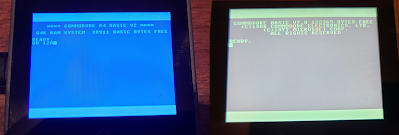 |
| GO 128 command |
Even my son asked, "Why do you need to do that?" Well, he has a point. I wanted a C64 that fit in my pocket or even on my wrist. And targeting new hardware platforms with my emulator is part of my hobby.
How does it work? Check out my highly technical drawing.
Now I already here you asking why I didn't connect Bluetooth to the M5Core, because certainly it has Bluetooth as well, and why didn't I use a USB keyboard connected to CoreS3, because it includes USB Host. But I've had trouble tracking down examples of HID Host examples for M5; client examples are prevalent, but host?
Pictured here is a phone is running Chrome with a custom copy of the html/javascript keyboard adapter including web-serial-polyfill because mobile Chrome doesn't directly include Serial API support. A Palm Pilot foldable keyboard has a Bluetooth adapter, paired with the phone. HID keystrokes are captured by the web page, converted to C64 key scan codes, and a list of the active key scan codes (or 64 when keys released) is sent over USB Serial to the M5Core device which is running the C64 ROMs which are tricked into thinking a real keyboard is attached; keystrokes are processed by the C64 KERNAL IRQ as normal.
The M5Core is being powered by the phone. Why M5Core? Because it's a polished packaged solution.
Yeah, we could just run a Commodore 64 emulator on the phone, but this way, I could have complete control over the keyboard emulation, what keys are present, how CTRL and Commodore keys work, etc. And it's just because I can, not because I should.
Why the Palm Keyboard? Because it folds in my pocket! And because I had one from back in the day. Any keyboard you can attach to a phone or computer should work. And this Bluetooth adapter just makes it so cool, and easier than a tethered keyboard.
The next step is to merge this solution with my Commodore 128 keyboard adapter to completely reject the portability feature. That would look really cool hooked up to my phone! Update (7/31/2023): check out YouTube for connection from ItsyBitsy/keyboard to Core Port.A.
 |
C128 Keyboard Adapter Breadboarded Prototype
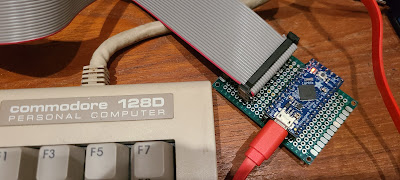 | | 7/23/2023: PCB prototype keyboard adapter w/ ItsyBitsy |
|
I am excited about my nonsense crazy adventures. Even if only I enjoy them.
=====
Update (7/2/2023): D64 support is currently working with Core2 only (Basic Core doesn't usually have the additional SPI RAM, but not yet sure why CoreS3 is failing to attach SD).
Update (7/3/2023): Got CoreS3 working with SD switching header to M5Unified.h for that target (was M5Cores3.h) and adding special definition, override logic for SD_CS to use GPIO_NUM_4 instead of default. See updates to M5Core.h.
Update (7/28/2023): Commodore 128D extended keyboard working with UART connection to Port.A of Core, and Commodore 128 emulation is ported as well.
=====


