Are you using a Commodore 64 keyboard and disk drive today? I try to, and I can't live without some combination of the following. (Self-promotion disclaimer - I created software for 1 & 2)
1. Remap the keys to match my PC keyboard muscle memory
patch your KERNAL ROM (physically, virtually, or run in RAM) hint: use One ROM for replacing (and electronically switching) physical ROMs
run a software keyboard remap driver (pre-built, or edit your own mappings)
use positional keyboard mapping if using an emulator
2. scroll through program listings and make editing on the C64 more enjoyable
SCRLEDIT Scrolling BASIC Editor original January 1988 Compute!'s Gazette, and updated
SCRLEDIT2 Scrolling BASIC Editor updated 2025, more features, different keystrokes
(note: not currently compatible with remap driver because of the way they sit in memory and hook the keyboard table vector for key presses.)
3. Use microSD or similar solution to managing disk images and files instead of floppies
This image shows a quick-reference for how to LIST out to a file, and have BASIC type in a listing from a file. This is not original work except for fixing the port to plus/4 and similar.
(plus/4,16,116 version is a careful and thoughtful port of the sx64.net version, meaning AI Gemini tried really hard, but kept getting confused by C64 knowledge. AI got the 2035 and 810 addresses right, but I had to research the values to poke. Informing AI of the correction, it kept trying to supplement the answer getting it more wrong, so I put an end to that!)
So on the C64 you could have commands like SYS 49152,X,Y,"TEXT" where your machine/assembly code could specifically parse the commas and numbers. The result was a way to interface between BASIC and Assembly to use the best of both worlds. BASIC is easy to edit, debug, and change. 6502 is fast and can do some low level operations including accessing all 64K RAM, and all the ROMs.
BUT!!! On the C128, the SYS command was extended to allow ease of passing registers. This is fine if you want to transfer data in 0..255 chunks. But coordinates on the screen are 320x200, so that goes past a byte, and addresses are 0..65535, they definitely go past a byte. And strings are another animal.
On the C128 the statement SYS 4864,1,2,3 will call the routine with .A, .X, .Y registers populated with 1, 2, and 3 respectively. That's fine and dandy, but if you want to do something more, you have to do it another way.
Here comes the new syntax:
SYS 4864 : REM 300, 65535, "Hello C128"
By using the token getter, you can check for colon, REM token, then proceed to parse values and variables as before on C64. (With the exception that I couldn't get expressions like 2+3 to work, maybe something to do with REM. But we can work around that.)
Check out the github repository for program listings including commented assembly for more details, and to grab a copy of the D64 containing the PRG.
Don't get me wrong. I love AI. I also hate AI. It's been great to me for writing C# utilities for work, or SQL queries, reviewing code, writing scripts in languages I don't even know (LUA) -- yeah that looks right, let's put that in production.
But for Commodore? Spoilers -- it's really horrible. I'll get back to that later.
My "fun" task for the day? I want to finally program high resolution graphics on my C128 VDC 80 column screen. It's well capable of 80x25. And I bought my C128D with 64K RAM specifically knowing it could do that high resolution graphics well. The original only came with 16K, and when it arrived COD at my door in 1987, I refused it and sent it back because of 11th hour nearly buyers remorse, delaying my gratification to wait a few more weeks for the newer C128D to arrive with more RAM.
The C64 could only do 320x200 graphics because it's a 40 column machine. The C128 had 80 columns and thus twice the resolution because it included two graphics chips and had two separate video outputs. BASIC 7.0 finally supported 320x200, but not graphics specific to the 80 column chip. I even purchased GEOS 128 with mouse and 1750 memory expansion, and saw the fulfillment of 640x200 graphics.
But was I fulfilled? No.
I am a programmer. Features don't exist until I code the programs that make them exist. I enjoy the process of learning APIs and languages, and developing new skills.
Later in 1988 I investigated the VDC (C128's 80 column video display controller) closer, with the guide of some magazine articles, and close scrutiny of the Commodore 128 Programmer's Guide which had a mere 4 pages of a minimalistic datasheet. I remember wanting to know how to do it. But as far as I got with changing and programming the VDC registers was a 40 column mode, and an 80x50 interlaced text mode. The former was released as RGB64, and the later was released as node-m (a unique terminal program). Graphics abilities unique to the C128 were not accomplished by me. Not in the 80s.
Now it's nearly 40 years later. VDC graphics programming is still a challenge I want to conquer. It's 2026, in the golden age of AI, technical assistants available at our fingertips.
Could AI provide me a working sample? No. I went round and round with it for hours. Gave up, and came back another weekend day for hours. Did it work? No. Was I close? Maybe.
One web link from AI gave a hint though. The reference was Commodore 128 Programming Secrets. The sample program on page 274, Figure 5-4, was short, just 25 lines, and didn't look very complicated. Obviously this was a joke, you can't achieve such a lofty goal as complicated VDC graphics in just 25 lines. There weren't even very many VDC register writes. But I typed it in, and once I figured out some decent parameters to feed it at runtime (10, -10, 1, -1), the results were presented on screen.
But how could this be? All that I learned researching with AI taught me it was so much more complicated than this. Then I reviewed the code, and my assumptions, and the paths AI had taken me down had to be set aside.
The algorithm in a nutshell is
Initialize raster graphics mode, giving up text screen, attributes, and character images
Write to screen memory as bytes going across, then down. First and high bits are on the left, last and low bits are on the right. In other words, use math.
Follow VDC register rules. And use block fill feature for speed.
I already knew the rules. Well, I did in 1988. And I've learned and relearned them over the years as I've dabbled in VDC programming. Nothing too special, but enough to know the basics. But there is the trappings too. And when you don't use something every day it's easy to forget even the basics. So let's write down the rules here so we all can refer back to them someday.
VDC rules
Access to VDC is through two C128 memory-mapped locations:
D600 is generally used to store a register number (and read status)
Access to VDC RAM (16K or 64) is only through the registers as well.
Want to write to a register? Store the register index in D600, then wait for the high bit to be set on D600 before storing the desired value in D601.
Want to read a register? store the register index in D600, then wait for the high bit to be set on D600 before reading the value from D601.
Want to write to memory? At some point you have to set the address using registers 18, 19. After that you can set the value in register 31.
For a block fill, you must write one memory value first, then you can write a count of the remaining slots you also want to fill. If you want to store 100 bytes total, you store 99 here.
Values in registers 18 (high), 19 (low) auto-increment, so either reading or writing various values to consecutive bytes doesn't require rewriting the address. But reading from the address, and writing back to it will require rewriting the address, otherwise it has jumped forward by one.
Screen memory is pointed to by registers 12, 13.
Attribute memory is pointed to by registers 20, 21.
Character images is pointed to by register 28 (high 3 bits). Shift those bits down and multiply by $2000 to get the VDC RAM address, or in reverse shift up.
VDC defaults to 16K RAM operation. 64K mode will scramble how the data is addressed, so would require reinitializing the screen, attributes, and characters.
Graphics mode (bit 7 of register 25) means that the VDC will render to the monitor line and byte by byte or bit by bit from screen memory.
640x200 monochrome requires 16000 bytes, so not enough left for screen, attributes, characters.
Other graphic modes are possible including using attributes for choosing different colors for cells, and even changing the dimensions of the cell (allows for more color changes). I'm not versed in this yet.
There are plenty of registers you should not change unless you understand them well, or are willing to take a risk.
C128D includes 8568 chip with the addition of an IRQ line when command completed (not wired to anything), and Sync Polarity options in a new register 37.
Attributes are different than C64 color memory. These are whole bytes! The lower 4 bits are RGBI (red/green/blue/intensity). The upper 4 bits are (character set, reverse, underline, and blink). The character set bit option lets you have 512 different characters on screen at any one time. And the reverse bit is useful for game developer, but not necessary for the Commodore character sets as they already have reverse in their latter half of their sets.
Attributes are optional. See AttrEnable bit 6 in register 25 for turning it off (0).
Tricks
BANK 15 (shown as the first F digit below in the monitor listing) is the default bank when C128 starts up. This memory map has access to I/O and KERNAL ROM.
C128 KERNAL already has routines for writing/reading to/from the VDC registers. These can be leveraged from BASIC as needed, especially useful for prototyping. SYS DEC("CDDA"),,R : RREG V : REM Read VDC Register SYS DEC("CDCC"),V,R : REM Write VDC register
C128 KERNAL has a routine to reset character images in the VDC RAM. JSR FF62. (Thanks AI for that tidbit scraped off the web.)
SCNCLR is a good way to reset screen and attribute memory. Similar to GRAPHIC 5,1 and PRINT CHR$(147).
I got fed up with AI. Mostly because it didn't work just vibe coding. I kept delivering results from programs, and they still wouldn't work. But I also argued.
I had to explain I didn't have BASIC 8.0, only 7.0
Explaining GRAPHIC 5 doesn't actually have anything to do with graphics
No, the processor doesn't have direct access to VDC RAM
Variable names cannot have underscores
Variable names must be two letters at most to differentiate from each other
Spaces are not required between keywords and variable names
Just arguing about nonsense that the AI had completely backwards.
AI putting in comments REM Completely Fixed Version
Explaining the right way of doing things, and AI insisting it was right instead
Explaining the right way of doing things, and AI treating me as I had led it astray in the first place, that it was my fault
No you can't prompt for values on the same screen trying to draw graphics. But you can use the 40 column screen simultaneously using GRAPHIC 0
No, that order of code is correct, if we change it, it will fail worse
Telling me there are two bugs, then listing three bugs
Outright hallucinations
So maybe it's a little unfair. These AIs have been around for a short time, and modern programming is a lot different than Commodore 128 programming. And there are so many options with the VDC, many not quite documented, more trial and error, through experience, not examples. With folks talking about the various options, AI can get these intertwined and mixed up.
Now that we know the answer, can we assist AI in providing us a working answer? I have a collection of AIs available to me. Let's try a simple prompt, and a complex prompt, and turn up the thinking as high as we can go.
Short prompt
Please provide me a Commodore 128 BASIC 7.0 working example of drawing a circle on the VDC 640x200 display in monochrome bitmapped mode using any facilities in a stock C128 available. Please provide a BASIC listing output in lowercase text only that will be accepted by a Commodore 128.
LLMs tested:
Qwen2.5-Coder 14B
gpt5-mini (High)
Windows 11 Copilot
Gemini
OpenAI 5.3-Codex (High)
Claude Sonnet 4.6 (Adaptive)
AI results
Out of the gate, Qwen2.5-Coder 14B, running on my own GPU mind you, produced remarks in uppercase, thought that simple pokes to addresses based on the coordinates would hit video memory, but worst of all used bit shifting ala C which is not present in Commodore BASIC 7.0. Also the while/wend loop should have been do while ... loop.
110 d = 3 - (radius << 1)

120 rem draw circle using Bresenham's algorithm
130 while x <= y

140 rem plot eight points of the circle
150 poke cx + x, cy + y : poke cx - x, cy + y
Actually Codex got the closest... it followed directions, produced a valid program free of syntax errors, it runs, and while it fails to clear the screen, an oval shape does appear.
5.3-Codex (High) result
I should have started and stayed with Codex a bit longer. I could have worked from this sample, fixing clearing the screen, and changing the aspect ratio of the circle would have been challenges I could have worked through. Looking back at my history I had started with it, and it had failed for me though, and led me down some more complicated paths.
In contrast, Windows 11 CoPilot produced a version with syntax errors. It didn't quite understand the syntax of Commodore BASIC 7.0. That's not how functions work, and you don't assign a value to a sys command.
30 def fnw(v,r):bank15:sys52684=0:rem placeholder
Gemini produced this listing:
10 graphic 5,120 color 0,2,130 circle 1,320,100,60,6040 getkey a$
50 graphic 0,1
Resulting in the following, because CIRCLE doesn't work in 80 column mode, because it's a text mode, not a graphics mode. No GRAPHIC command will put you in a graphics mode using VDC.
?NO GRAPHICS AREA ERROR IN 30
Claude Sonnet 4.6 (Adaptive) thought for 19m 2s and I reached my 5 hour limit before being prompted to upgrade to a paid plan. That was a lot of thinking! I'm not upgrading to program an 8-bit computer. Wake up the next morning, hit continue, and immediately it produces a similar program like Gemini did. Similar error resulted, this time in line 40. Nice, line 50 draws on the text screen. But line 60 thinks inkey$ does something... it stays empty forever. Sonnet, if you were taking notes from Gemini, you should have copied it's line 40 instead. And switching to the 40 column screen was unnecessary. The other commands are nice though, but no circle produced.
10 graphic 5,120color0,130color1,240 circle 1,320,100,80,8050 char 1,1,23,"press any key to exit"60do:loopuntil inkey$<>""70 graphic 0,180end
gpt5-mini (High) keeps prompting in Visual Studio Code for browsing web pages and is stuck on thinking Commodore has vpeek/vpoke, and because of Graphic command in BASIC 7.0, it must have commands for VDC, but it keeps looking and looking... after about 8 prompts to browse web pages I'm stopping it, it just keeps looking at general programming html sites (and one PDF).
My solution (disclaimer: Claude did earlier find a logic error in my code that fixed a problem I was having, turned into one of my rules for VDC about register reads auto advancing the memory pointer, and having to reset it to write a changed value). So reviewing code worked out, but generating it not so much. My own developed solution is attached:
No AI generated code here, but was AI reviewed
100 rem-----------------------------------------------------------------------
110 rem vdc 640x200 monochrome
120 rem copyright (c) 2026 by david r. van wagner
130 rem mit license
140 rem
150 rem davevw.com
160 rem github.com/davevw
170 rem mit license
180 rem-----------------------------------------------------------------------
190 def fnac(x)=2*atn(sqr(1-x*x)/(1+x))
200 trap 900
210 graphic5,1:fast
220 for i=1 to 21:print chr$(17);:next
230 data 1,2,4,8,16,32,64,128:dimbi(7):fori=0to7:readbi(i):next
240 print"screen";:r=12:gosub 1040:gosub 1050:sc=ad
250 print"attrs ";:r=20:gosub 1040:gosub 1050:at=ad
260 print"chars ";:r=28:gosub 1000:ad=int(v/32)*8192:gosub1050:cr=ad
270 for i=1 to 1000:next:scnclr
280 r=25:gosub 1000:v=v and (255-64) or 128:gosub 1010
290 ad=sc:gosub1060:wait dec("d600"),128:f=0:c=16000:gosub 1070
300 for x=0 to 639:a=fnac((x-320)/321):y=int(99*sin(a)+100):gosub1080
310 y=199-y:gosub 1080:next x
320 getkey a$
900 r=25:gosub 1000:v=v and 127 or 64:gosub 1010:sys dec("ff62"):scnclr
910 if er<>-1 then print err$(err)" at line "el
999 end:rem ******* reusable subroutines *******
1000 sys(dec("cdda")),,r:rreg v:return:rem ** read vdc reg r into v **
1010 sys(dec("cdcc")),v,r:return:rem ** write vdc reg r value v **
1020 sys(dec("cdcf")),v:return:rem ** write next byte **
1030 sys(dec("cddd")):rreg v:return:rem ** read next byte **
1040 gosub 1000:ad=v*256:r=r+1:gosub 1000:ad=ad+v:return:rem ** get address **
1050 printusing" ##";r-1;:printusing" ##";r;:printusing" #####";ad:return:****
1060 r=18:v=ad/256:gosub1010:r=19:v=adand255:gosub1010:return:rem *update addr*
1070 i=0:do while i<c:rem ** block fill (begin) **
1071 r=31:v=f:gosub 1010
1072 v=c-i-1:if v>0 then begin
1073 :ifv>255thenv=255
1074 :r=30:gosub1010
1075 bend
1076 i=i+v+1
1077 wait dec("d600"),128
1078 loop
1079 return:rem ** block fill (end) **
1080 ad=sc+int(y)*80+int(x/8):gosub1060:rem ** plot (begin) **
1081 r=31:gosub1000:n=v or bi(7-(xand7)):gosub1060:r=31:v=n:gosub1010
1082 return:rem ** plot (end) **
Granted, this is more of an oval. I was going for a large oval on all of the screen: 319 radius on the x axis, and 99 radius on the y axis. The arc cosine is my attempt at a more intact circle.
Conclusion
I will continue to use AI for certain things, but Commodore vibe coding is not there yet for my needs when I don't have the answers. AI and myself went down a long path of unknowns, assumptions, inaccuracies, and under/over-complexities. What ended up working was digging in for myself, trying little things, and lots of credit goes to Commodore 128 Programming Secrets as it produced a sample program that did the job.
The elusive detail was that when turning on bitmap mode in the VDC, screen memory (not character memory) is where the raster data goes. And with an original 16K RAM attached to VDC, there's no room for attributes, so disable them. How would an AI know this?
Noted, I may have tricked the AIs, by not giving them all the detail they needed, especially that VDC graphics primitives are not present in Commodore 128 ROMs and BASIC commands. And some of my earlier AI prompts dived right into 64K options that overcomplicated the situation.
I could update the prompts to guide AI closer to the answers, now that I know the answers, but what's the point? I didn't have all the answers, so I was searching. I should have probably stuck with web searches rather than trust AI to solely come up with the answer.
You have to be pretty smart to use AI effectively. I may have failed myself this round using AI. Throwing too much faith into AI is also a mistake.
Remember there are no guarantees. So try to have fun on the journey, learning, even when some paths lead to failure. But in the end, don't give up. There are other paths and you may find them next time. Don't give up on programming/researching yourself, and don't give up on AI as its capabilities are remarkable. Learn new things, learn new ways of doing things, and next time might be better and more efficient solution.
For me, it started as an idea to make a featured game for my handheld Commodore emulator platform, most importantly the ones I can easily transport on my person. I've written a simple but not complete Commodore emulator that behaves well on ESP32 and other available microcontrollers. One example hardware platform is the M5Stack Fire that I can stick in my pocket and has physical buttons for inputs.
I was away on vacation with the family when I came up with the idea of replicating the snake game. I was yearning for a good coding puzzle, and this was it!
So I started brainstorming on how one would accomplish it.
First, I decided to just use BASIC. It comes with the Commodores, and is relatively easy to work with. I only have 40+ years experience so I should be able to get by. So no machine language this time.
What system should I develop for? Vic-20 is good for games as the text screen is small (22x23) and the characters are big, easy to see.
The key to snake is that each time it eats food it gets longer, so the snake is bigger and bigger as the game progresses, becoming an obstacle to your own movements. As the snake moves, it inches along, the head advancing in one direction, and the tail catching up to where its next to last segment was. So constantly the head and tail are both moving, and we have to keep track of where they are. The answer is a circular buffer! Segment locations will be stored in a circular buffer.
What data structures do we have with BASIC? Just arrays. Can we implement a circular buffer with an array? Certainly, the array must be pre-allocated (DIM) with a fixed size, and keep track of the head and tail of the snake for the extents of the segments. This is how you would do it in Pascal or C with an array, so BASIC is not much different.
How big should the array be? Let's go big and say the snake can be as large as the screen. But we want a title and score on the screen too, so let's say the bottom line is reserved for those. That leaves 22x22 locations for the segments = 484. Let's plan on keeping an offset into screen memory in each array element.
How should game inputs work? Since my target platform has three buttons pre-configured for Up/Enter/Down, I want to use those, specifically Up/Down since I don't have access to four direction buttons. I intend to use those buttons to rotate the direction left or right relative to the snake's current direction.
How shall we display the snake? I bring up a PETSCII chart and look at the graphics characters. I pick a circle outline as the head, a solid circle as body segments, and a graphic X as the death character. Later in the process I chose the diamond as the food character.
So first step I implement the screen layout, place a single segment in the center of the screen, and implement moving around every second. With some fine-tuning I get it working well, including implementing dying if hit the edge of the screen. I am tracking horizontal position in X (0 to 21) and vertical position in Y (0 to 21) with DX and DY being -1, 0, or 1 each. The D stands for difference or direction. Moving is as easy as adding DX to X, and DY to Y, then making sure it is still within bounds, otherwise dead.
Quickly I found that allocating floating point values for the snake segments caused the original Vic-20 to run out of memory, so the array was changed to DIM S%(SZ) to use 2-byte integers instead of 5-byte floats.
The basics are in place, but the snake is not growing yet. Next the circular buffer is implemented, and I implement computing the length of the snake for the score. It took a few tries to get right, and once finished, I realized I could just track the score/length separately without all that fancy work, but it's done, so I let it be.
If the next position is another character or out of bounds, the snake dies. If the next position is not food, the snake's tail is shortened so the snake appears to move. But if the next position is food, then the snake appears to grow because the tail remains in place. The head is drawn at the next position.
Between moves there is a delay of a fraction of seconds. And as the snake gets longer, the delay gets smaller with a minimum delay to speed up the game, but keep it reasonable.
It took many incremental tries to get everything just right, took the opportunity of beta testing and feedback from my son, and addressed stuff including an opening information screen, the title/copyright/score bar, timing, and fixing bugs. The bugs included running into your own tail that was about to move -- that is allowed, testable by spinning in a tight loop when 4 segments long.
For inputs on a standard Vic-20, I remembered that cursor keys use shift to go the opposite direction. That would be unnatural to require on a real Commodore, so I added Z and / (slash) as alternate inputs for rotating the head. These keys are at opposite sides of the keyboard, so easy to indicate turn left or turn right. (If someone doesn't like the key layout, it's in BASIC, easy enough to change.)
During the process of refinement I added random colors to the food, adjusted the randomizer to pick different colors than the head/tail of the snake so it appears to change, and the snake picks up the color of the food for an interesting effect. Also the background color is avoided so the snake doesn't become invisible.
Next added Vic-20 joystick support. Joystick support is implemented to direct the snake the literal direction of the joystick instead of rotating. And avoids the direction opposite that the snake is already going so it impossible to reverse onto itself (otherwise the snake would die more often). Also because of how the joystick and the keyboard share some input lines, it is necessary to disable some keyboard lines to read the joystick successfully. Pressing STOP will break the program, but not reset the keyboard. This renders some keys unusable until STOP+RESTORE resets the keyboard.
Once the Vic-20 version was stable, source was pushed to GitHub.
Then the game was ported to Commodore 64 with 40 column screen.
And after that, Commodore Plus/4 and 16 port. initially with a machine language routine for reading the joystick until realizing that support is already in BASIC.
Next came a Commodore PET port designed to support most if not various models all running Commodore BASIC, including 40/80 column models, and actively switching to the uppercase/graphics character set in case a model defaults to lowercase. Since the PET doesn't normally have a visible border, inverse spaces are placed around the edges to contain the snake a bit more. Some screen real estate is lost but playability is gained.
I fell in love with the green on black look of the PET game, mostly for nostalgia, but to me it just looks perfect! And that's when I adjusted the PET version to also run successfully on Vic-20 and C64. It happens to work on C128 and Plus/4, 16 as well. The PET version doesn't support joystick though, is all keyboard. Detection of C64 turns colors to green on black, and Vic-20 does white on black.
Here is a single player version of the classic snake game that I have recreated in BASIC for the Commodore Vic-20. Some may remember snake from the Nokia classic phones (1998) or from Atari VCS 2600: Surround (1977).
I have a Commodore watch platform (M5Stack with watch wristband running my Commodore emulators) which I can run some simple programs. The purpose of developing this game was to create something I could play on my watch with just two buttons.
Apparently my high score is 73. Try to beat that!
Open source (MIT License) and binaries including disk image are available at github.
Update 2025-04-16: Also ported to C64 for those so inclined.
Update 2025-04-19: Ported to Commodore PET and TED systems: Plus/4, 16, etc.
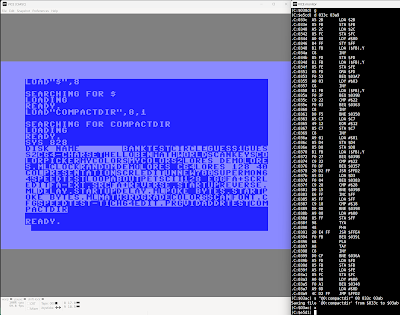
Directory listings scrolling by too fast? Want to scan program for string literals? Here's a stupid (sometimes useful, definitely ugly) utility I created in the monitor for both scenarios. Compact display and pauses every 24 lines. Attempts to avoid control characters.
Note: operates on whatever loaded program is in memory, assuming BASIC.
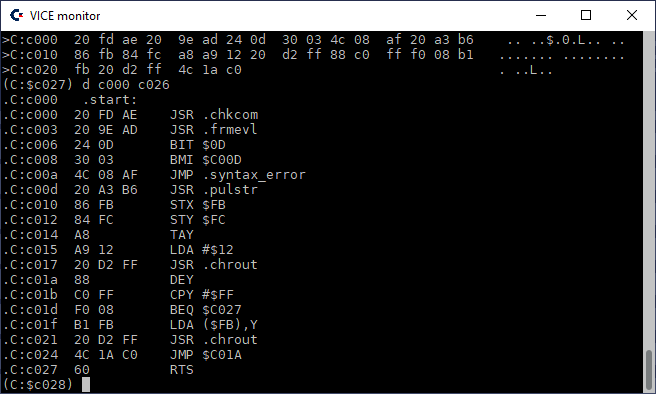
Shown loading into tape buffer (828), can be relocated.
This source is an example of parsing a BASIC program. The beginning of BASIC is grabbed from $2B/2C, and each line of the program is iterated through traveling its linked list ending with a null pointer. In each line, a string starts with double quotes and ends with double quotes or end of line (zero or nul character). Multiple strings per lines are possible. Other memory addresses used include toggling the reverse flag ($C7), setting quote ($D4) and insert ($D8) modes, and counting each time at the left column ($D3). Outputs string characters via $FFD2, and waits for a key press via $FFE4.
This is a short program that can be studied. I hope you find it useful and informative. Enjoy!
Copyright (c) 2024 by David R. Van Wagner MIT LICENSE
UPDATE: (September 3, 2024) compact version was too ugly for me. Have since updated source to display one string per row of the screen, with an option (POKE 951, 96) to revert to compact functionality. See updated links above.
First was the design of the user interface, by creating PRINT statements. Used reverse text to make a rectangular box with the keys displayed.
How to click on a key? I'm so used to a mouse or touch interface. Oops, Commodore doesn't have that usually, or not so easy. Ignoring the 1351 mouse for now. Most Commodore users are used to using the keyboard or joystick. Forget the joystick, this is not a game! Keyboard entry one key at a time will do just fine. Note that ENTER also acts as =, and DEL is equivalent to ←, and X is a synonym for *.
Entry of digits was the first processing, accepting up to the limit of the display. This stored as a string (V$) with keyed entries appended.
I started with 7 digits, but outgrew that in testing and increased to 9 digits.
At first, only positive numbers were supported, then fixed it to support negative numbers, with the negative sign taking up a position in the display. The N key toggles a number entry between positive and negative and back again.
Entries allowed by this calculator are interleaved numbers and binary (two argument) operators. Note that immediate operators like C and N usually take effect immediately, whereas binary operators require multiple arguments and a finalization (another binary operator or =).
There are exceptions allowed in entries to overwrite the prior value or the prior operator. Examples:
1+1=3 keyed entries will replace the 2 with a 3
2+x3 will replace the addition operator with multiplication operator
Precedence needs a Stack
One design requirement I set for myself was to include operator precedence. This means that multiplication and division have the same higher precedence over addition and subtraction at the same lower precedence. Usually math is evaluated left to right, but due to precedence issues, other operators may need to be done first. In other words the expression 1+2x3 is equivalent to 1 + (2x3) and then 1 + 6 and finally evaluates to 7. But 1 x 2 + 3 is equivalent to (1x2) + 3, then 2 + 3, and finally 5.
I simply put numbers and operators interchangeably on a stack in order of entry until enough information is present to start evaluating.
Rule 1 - if user presses =, then evaluate
Rule 2 - if first operator is multiplication or division, once the second number is finalized with a second operator, simply evaluate the first expression
Rule 3 - if first operator is addition or subtraction, defer until the second operator and third number is finalized (third operator present!), then figure out what to do - either evaluate first or second expression, reducing the work
The stack is implemented as a count C, and an array of strings S$, which is expected to only grow up to 6 items (0..5), example C=6, S$[0]="1" [1]="+" [2]="2" [3]="*" [4]="3" [5]="+"
This example 1+2*3+ is reduced to 1+6+ and then to 7+, with the display updated to show the 7, but then wiped to disallow appending to it.
And no, I'm not doing RPN. I didn't grow up with an HP calculator, nor am I implementing one today. I grew up with Texas Instruments, and that's how my brain works. Keeping it in entry order keeps it orderly for me. Sure, there are other was to approach it. This is BASIC, not Lisp. And this is MY calculator, so I'm doing it MY way. Others can follow their own paths.
Expression evaluation includes handling the equals = operation. In the context of this calculator, that finalizes a calculation, meaning the user wants the result now.
Subroutines
There are several subroutines: 1) Evaluate and reduce stack, 2) Update display, 3) Display stack, 4) Evaluate simple expression involving two numbers and an operator.
That last subroutine is a diagnostic useful most for development, but also shows work in progress compared to a regular simple desk calculator that usually won't show pending work.
Error conditions
Overflow is when the number to be displayed doesn't fit in the 9 digit display, when the string representation of the number is long than 9 characters and/or larger than the maximum whole integer value that can be displayed in that space. Note that the number is still internally represented and can still be acted on. If a resulting answer can be displayed it will be (example: divide a ten digit positive number by 10).
Error indicates that division by zero was attempted.
Limitations
Only integers are supported. No decimal numbers. No currency. Workaround required to calculate a percentage -- multiply by one hundred first, then divide by whole percentage. And division results in a whole number so 1/3= results 0, and 5/2= evaluates to 2.
Non-negative numbers are limited 0 to 999999999 (nine digits). Negative numbers are limited -1 to -99999999 (note only 8 digits).
Scientific notation is not supported.
No paper tape, no printout, no record of operations.
Limited user feedback. No keypress indicators.
Stack diagnostic is a little technical, especially with a count, then colon, and the entries. (Could eliminate the count and colon, and/or show previous and pending operators before and after the display.)
Keyboard entry.
Extras
The program was saved with a starting address $400, to support PET, so you must not load with secondary address 1 on a C64! And while the program assumes a screen bigger than a VIC-20, a few minor changes to the margin and startup text can remedy that.
Next
What does the future hold? Who can predict with any accuracy? I can say anything here, but doesn't mean I'll follow through. I originally was contemplating near limitless number of digits (considering the 8-bit platform, probably some 16-bit limitation). Maybe binary and hex? Maybe a scientific calculator? Fixed decimal? Near limitless decimals? Port to assembly for fun! We'll see...
The BASIC commands are implemented, small font created, and demonstrations implemented. Please enjoy this Space War and Omega Race inspired flying ship.
Source, disk image, and more details are on github for Commodore Vic-20 with memory expansion.
BASIC extension command syntax is:
COLOR [foreground[+8][,[background][,[border][,auxillary[,inverse]]]]]
COLOR [foreground[+8]] @ x1,y1 [TO x2,y2]
TEXT
HIRES xresolution, yresolution [,fillbyte]
DELAY jiffies
PLOT COLOR ON|OFF
PLOT [NOT|CLR] (@ x1,y1)|(TO x2,y2)... **
PLOT 0|1|2|3 (@ x1,y1)|(TO x2,y2)...
PLOT "ABC" @ x,y [,addr [,width,height [,bytes]]]
RECT [NOT|CLR] [@] x1,y1 TO x2,y2
RECT 0|1|2|3 @ x1,y1 TO x2,y2
SHAPE GET|PUT|OR|XOR|AND|NOT|CLR addr @ x1, y1 TO x2, y2
My son Ben (age 9) designed all the graphics, background and colors. He edited the background screen strictly with inverse spaces. Sprites were edited on the Commodore 128 with SPRDEF. The programming manual has instructions on saving the sprite memory to disk. And I was able to save both the text screen and colors to disk also using the dual screen capability of the Commodore 128 to enter the commands via the 80 column screen (ESC+X). My memory is that I used MONITOR to save using hex addresses, whereas I'm showing BSAVE commands here for more symmetry with the program listing.
BSAVE "SPRITES",B0,P3584 TO P4096
BSAVE "BACKGROUND",B0,P1024 TO P2048
BSAVE "COLORS",B15,P55296 TO P56320
I wrote the BASIC demo to randomly move the characters, and flash the border red when the sprites collide.
My son and I made a great team on this project. Thanks to his art and I am very pleased to have introduced him to the Commodore 128 and have him involved in computer animation.
The Vic-20 doesn't have a native graphics mode. But it can use a character set from onboard RAM, and double the size of character cells from 8x8 to 8x16 pixels.
A solution puts video memory at address 4096 ($1000), and character RAM at ($1000). Notice they are the same? Yes, there's only 5K onboard RAM in addition to color RAM. The first 1K starts at address 0 ($0000), and the other 4K starts at address 4096 ($1000). Regardless of any other RAM present in the system (can add 35K), only that latter 4K is accessible as video/character RAM to the video chip. (Even if the earlier 1K is available, there's too many conflicts with BASIC and KERNAL use).
So bitmapped characters (graphics) and video RAM (characters on the screen) have to share the same section of memory. The way bytes work, at most 256 characters could be displayed on the screen, but that would require a full 4K of RAM for their bitmaps (16*256), so something has to give. By using only 240 characters on the screen, that reserves 16*16 = 256 bytes for video memory, and the remaining memory can be used for graphics. For the bitmap to skip over screen memory and avoiding any overlap, the characters used on the screen are indexed starting at 16 ($10).
$1000-$10EF screen (240 bytes), values $10-$FF (16 to 255)
$10F0-$10FF unused (16 bytes)
$1100-$1FFF bitmap (3840 bytes)
BASIC RAM can be moved to either 3K expansion RAM ($400-$FFF) or 8K or greater expansion RAM ($2000 and later).
One layout that is possible is 20 characters wide by 12 characters tall = 240 characters = 160x192 resolution.
The easiest layout of characters is to store them consecutively in memory as shown above. Character layout for the screen is left to right, then wraps to the next row. This scheme matches color memory layout as well. An additional advantage is that time sensitive updates to graphics can be more aligned with the raster line.
Another layout of characters is to line them up vertically as shown below. This has the advantage that memory is contiguous vertically until advancing to the next column of 8 pixels. This allows for optimizations in managing graphics memory at the disadvantage of working vertically instead of horizontally, thus fighting the raster line. But color memory is still horizontally oriented, so the address calculation is different, the same as the earlier layout.
As the Vic-20 allows for configuring the number of character columns, character rows, and adjusting top and left margins, a variety of resolutions are possible.
Some notable resolutions include
160x192, 192x160, 200x144, 144x208, 160x160
The last is mentioned as it is the resolution used by the Super Expander cartridge. But note it only requires 200 bytes of screen memory, so using that resolution leaves 696 bytes of onboard memory unused for graphics/screen that could be available for another use, maybe 506 bytes is still text screen memory.
This example accepts one address value, followed by multiple byte values appended to the SYS command on Commodore 64.
This could be useful for POKEing to screen memory, sprite data, programmable character data, consecutive I/O registers, etc. efficiently in a single statement.
Forget PowerPoint or Google Slides or Apple Keynote. Here is a newer solution for the Commodore 64. Simply use DATA statements in BASIC to define the layout of your slides. What could be easier than that?


%20clipped.png)

.png)