Wednesday, May 4, 2022

C128 model support added to simple 6502 Commodore emulator

The Commodore 128 is a favorite system of mine.  I've owned a DCR model (cost reduced with embedded disk drive, the metal case) since around 1987.  And it still works fine!

But this article is about emulation.  I already wrote a C#/.NET based emulator that supports PET/Vic-20/64/16/Plus/4, and just recently have added 128 support.   I thought it would be difficult with the C128 custom MMU and VDC.  There was a learning curve.  And I faked enough of it to boot and work (even with no Z80).


This simple emulator is a text based emulator run from a console window.  It provides only text input and output, in addition to LOAD/SAVE support to the local disk as .PRG files (just a common extension for Commodore program files, unformatted binary data). 

Feed the emulator some Commodore ROMs (not included, recommend grab these from Vice) and it can map ROM/RAM into the 6502 memory space and execute 6502 instructions. There are some common KERNAL entry points for character in, character out, check for stop, and load/verify/save operations.   These calls are hooked to redirect console input/output to the emulated 6502.  Effectively the Commodore computers are running in software.

These emulated systems don't do the fancy video games.  There is a long list of things they don't do, including no PETSCII graphics either.  No graphics.  No sound.  No timers.  No color.  They don't even do full screen editing.  They are stuck using the console editing features.  Not great, but it works -- cursor up to recall a previous command in the current screen line editor.  And the Windows console editor even survives restarting the program or restarting the Commodore.  Please note it is best to use Caps Lock as the Commodore expects uppercase commands most of the time.

What this does function as is a good text BASIC interpreter, and 6502 machine language environment.   Some of the Commodore systems such as the C128 and Plus/4 include their own machine language monitor (MONITOR command).  On the PET, Vic-20, and C64, you can load the appropriate SUPERMON for that system.


Since we're using a Windows console in this case (or Linux or MAC... .NET supports them too!), it can be sized to screens larger than 40x25 as well.  Imagine the capability of full screen text written in BASIC!   Or a long disassembly listing in the monitor.  Wow!

Here's how to get started.

1. Grab the sources from github

2. Grab the roms from vice, (a much larger more complete and more accurate emulator, but why would you want that much fun?).   Put these in a c128 directory from which you will run the simple emulator.  While you're at it, create subdirectories and copy roms for the other systems too.

c128: kernal, basiclo, basichi, chargen

c64: kernal, basic, chargen

vic20: kernal, basic, chargen

ted: kernal, basic

pet: basic1, edit1g, kernal1

3. Compile using Visual Studio or dotnet.

4. Run with the command line argument: c128


Why do this?  To me this was a challenge to first emulate the 6502, and a challenge to minimally support Commodore BASIC.  I thought what is the least amount of support that is needed to have a useful Commodore computer?  I knew about the Kernal jump table definition by Commodore.  I had seen others do it successfully.  And I wanted to do it my way.   It was just a mountain to climb, and since I love 6502 and Commodore computers, it is an enjoyable part of my hobby.


What's next?  Probably more blogs and videos documenting and demonstrating this stuff.  My goal is to help others learn and in this case specifically enjoy Commodore systems.   The source code is open so you're free to inspect and modify it (giving credit where credit is due of course).

Thursday, December 23, 2021

Trace C64 I/O Kernal Jump Table Calls

See what your C64 programs are up to!   Debug, or help transition from BASIC to assembly language I/O programming.

c64-io_monitor is a program that allows monitoring or tracing input/output calls on the Commodore 64.  It can show counts or a trace log of what calls have occurred.   

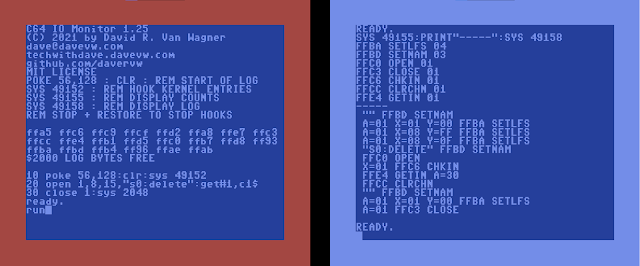
The screenshots show the initial copyright screen, with usage hints, and status (includes trace log bytes available), followed by an example program, and the counts and trace log from running this program.

Basic usage includes loading io_monitor program from disk at absolute address $C000.   It is recommended to lower BASIC by poking to memory address 56 (e.g. POKE 56, 128).  Then NEW to both clear variables and reset BASIC program pointers.  And use SYS 49152 to initialize the trace/monitor.

    LOAD "io?monitor",8,1
    POKE 56,128
    NEW
    SYS 49152 : REM START MONITOR

The monitor copies BASIC/KERNAL ROMs to RAM, patches them to hook the I/O entry points in the Commodore 64 kernal jump table at the end of ROM within the $FF00-$FFFF range.  The hooks take care of counting calls, and logging trace information in available RAM.  While each call is made, the border color is incremented to show it is working.

At this point, you may make any I/O calls including keyboard input (plus RETURN), screen output, disk/tape I/O, etc.   The I/O calls will be counted/logged.

When you are finished with the monitoring session, it is recommended to press STOP+RESTORE to reset back to the KERNAL ROMs, then the counts and tracing is turned off.

Counts can be displayed with SYS 49155, and the trace log can be displayed with SYS 49158.

The trace log can be sent to a file with statements like the following:

    OPEN 1,8,3,"@0:TESTLOG,S,W"
    CMD 1
    SYS 49155: REM COUNTS
    SYS 49158: REM VIEW LOG
    PRINT#1
    CLOSE 1


Why did I create this?  I have been developing some simple (text only) 6502 Commodore emulators (one, two, three, four, five) for multiple targets (web, Windows console/terminal, Linux terminal, Mac terminal, Arduino UART, ESP32 UART, Teensy LCD, STM32F4 LCD, and more embedded targets) and am looking at supporting file I/O emulation (open, input, get, print, close, etc.) above and beyond my D64 emulation.  One step along the way is understanding Commodore I/O some more from the machine language level.  Seeing a trace log provides a closer in-action view of the kernal I/O routines.


Links

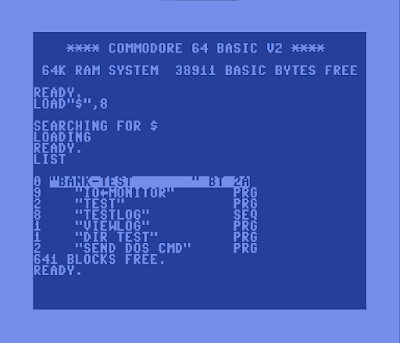
The D64 disk image contains the machine code for io_monitor (also available as PRG), and some sample programs that can be used to demonstrate the functionality, including viewlog which opens and displays a sequential file (e.g. testlog saved to disk like above).  The source code posted to github is open source (MIT Licensed meaning free to use/alter/distribute, giving credit where credit is due, with no warranties).

Hackaday linked to this article


Sunday, April 25, 2021

Low Resolution Graphics for Commodore

Commodore systems come with a graphical character set that can be used for low resolution graphics.

PETSCII low resolution 80x50 example

All the Commodores include block patterned graphics that can be used to display 2x2 pattern blocks, to double both the horizontal and vertical text resolution, for example from 40x25 to 80x50.  Like 4K for the day!  

PETSCII block characters including inverted

In the back of our high school math classroom was an original PET 2001.   This system had a chicklet keyboard, built-in cassette drive, and 40 column white on black monochrome screen.  This system has no graphics modes beyond the PETSCII capabilities.

One of the exercises in my Algebra 2 class was to graph mathematically functions.  I successfully challenged myself back then to plot the graph on the PET using this block graphics method.

Using 8 PETSCII characters, and the inverse of those characters, all 16 combinations of the patterns can be achieved by setting (POKE) the correct value onto the screen (see the A array in the source).  Also achieved is reading (PEEK) the current PETSCII value, converting that into pixel data, and combining existing plotted pixels with a new pixel (see the B array in the source).

LORES PET 40COL listing

My handwritten PET listing from 1982

I found my handwritten program listing that dates back to 1982.  It's beautiful to see that graphics could be achieved with PETSCII with only a few lines of code.  From my positive experiences with the PET, I purchased a Commodore Vic-20, and the Super Expander later in 1983 and switched to high resolution graphics at that point.

A disk image (D64) of samples for PET/Vic-20/C64 is available.  Screen memory locations for PEEK/POKE are different for all the systems, and sizes are adjusted with variables for the 80 column PET, and 22 column Vic-20.  The Vic-20 and C64 also have color memory, so an additional POKE is included to match the current text foreground color (PEEK(646)).  

Update [5/13/2022] there are ports for both Commodore 128 40 column screen, Commodore 128 80 column screen (including SYS calls to read/write VDC 8563), and a port to the TED (C16, Plus/4) series systems showing a color gradient possible with those systems.

Disk Listing for different Commodore Models

Vic-20 low resolution 44x46 plot

Contrast with 320x200 high resolution from C64

PET 80 column screen 160x50 sample

[Change:] 80 P=COS(I)*SIN(I)*2

Commodore 16, Plus/4 screen 80x50 sample (TED)

Monday, February 22, 2021

C64 Emulator for Teensy 4.1 LCD/USB/SD(D64)


Here is my Teensy 4.1 on a breadboard pretending to be a Commodore 64.  USB keyboard, color text, background, border, and D64 (1541 image) support for LOAD/$/SAVE.  6502 emulation supports machine language, and Commodore 2.0 BASIC programs.   Sorry text only, no games, no graphics, no sound, no joysticks, just simple stuff for now.  But that simple stuff works! (mileage may vary, lightly tested, please try this at home under controlled conditions).


Sunday, January 17, 2021

How to Build Vice 3.5 (x64sc, etc.) on Raspberry Pi 400

Raspberry Pi 400


The Raspberry Pi 400 invokes a sense of nostalgia back to the all-in-one systems of the past, such as those commonly available in the 80's (about 40 years ago!) of having the keyboard and computer all in one, with connections at the back of the enclosure, and expansion at the back of the enclosure.

My favorite system released January 1982 was the Commodore 64.

So why not have both?  With emulation, let the Raspberry Pi 400 become a Commodore 64 as well.

Vice 3.5 built, running on Raspian

One way to do this, is using Vice (the Versatile Commodore emulator).  Of course you can use a prepackaged solution like Retropie and Emulation Station.  But since it is open source, you can also just download and build the source yourself.

As vice 3.5 was just released Christmas Eve, 2020, it makes a lot of sense to build yourself, so you can have the latest build relatively easily.  Just think of all those new features!!!

I've attempted this myself on my Raspberry Pi 400 (and expect should work on others fine too) with Raspian.  I've tested with both the latest 32-bit ARM, and beta 64-bit ARM builds.

Following are the steps I took to accomplish building the default configuration.  I followed the basic instructions, and when configuration or build failed due to a dependency, researched the dependencies necessary (thanks Google and all those who have built before me and posted their solutions).  

Grab yourself your favorite beverage, power up your Pi, and get building!   And once you're done, feel free to test my hires.d64 image.  Maybe even pick up some keyboard stickers.   And also can run Pet, Vic-20, Commodore 128, etc.

Summary

  1. Install dependency packages
  2. Download three archives from web: vice 3.5, SDL2, SDL2_image
  3. extract the archives to their respective directories
  4. configure, build, and install each iteratively in the order: SDL2, SDL2_image, vice 3.5
Full Steps (note versions may change, these were the ones available January 2021):

  • sudo apt-get install flex bison xa65 libgtk2.0-dev texinfo libxxf86vm-dev dos2unix libpulse-dev libasound2-dev
  • sudo apt-get install texlive-latex-base texlive-fonts-recommended texlive-fonts-extra texlive-latex-extra 


Thursday, August 6, 2020

Commodore 64 BASIC CRUNCH Routine Commented

The disassembled code here is from
Commodore 64 ROM.

The comments and intermediate labels
are mine.

Together they are useful.

Placing this here as is for reference.
I found this exercise necessary when
implementing my hires extensions for C64
including a patch of this routine.

        ; C64 crunch is A57C-A612
        ; C64 tokens are A09E-A19D
crunch ; from C64 ROM
       ; INPUT: PETASCII of entered line is at buffer $0200, ending with #$00 null character
       ; OUTPUT: tokenizes in place entire line, ending line with #$00 null character
       ; HINT: because of tokens, result is smaller than original so can modify in place
         LDX $7A        ; source buffer index
         LDY #$04       ; storage index starts at 4 (4+$1FB+1 = $200)
         STY $0F        ; set not DATA flag (4=NOT, 0=DATA)
.go      LDA $0200,X    ; retrieve next character from input buffer
         BPL .lowch     ; branch if 00-7F
         CMP #$FF       ; PI?
         BEQ .store     ; branch if PI, already tokenized
         INX            ; advance source index
         BNE .go        ; always skip initial character 80-FE, as X shouldn't ever wrap to 0
.lowch   CMP #$20       ; compare to ASCII space
         BEQ .store     ; branch if space, store literal
         STA $08        ; no, store character, non-zero = not REMark
         CMP #$22       ; compare to ASCII quote
         BEQ .literal   ; branch if string, store literal characters instead of matchng tokens
         BIT $0F        ; test if in DATA statement
         BVS .store     ; branch if in DATA statement, store literal characters instead of matching tokens
         CMP #$3F       ; compare to ASCII question mark
         BNE .chkzero   ; no, skip next part
         LDA #$99       ; replace question mark with token PRINT
         BNE .store     ; unconditional branch, store token
.chkzero CMP #$30       ; compare to ASCII zero digit
         BCC .scantbl   ; branch if less
         CMP #$3C       ; compare to ASCII less than
         BCC .store     ; branch if less, so branch if numeric or colon or semi-colon, store literal character
.scantbl STY $71        ; save storage offset index
         LDY #$00       ; initialize token table byte index to zero
         STY $0B        ; initialize token number to zero
         DEY            ; cancel out the next increment for loop beginning with decrement
         STX $7A        ; save source index
         DEX            ; cancel out the next increment for loop beginning with decrement
.advance INY            ; advance token table index
         INX            ; advance source index
.scanch  LDA $0200,X    ; retrieve character from buffer
         SEC            ; prepare for subtraction
         SBC $A09E,Y    ; compare to Commodore token table
         BEQ .advance   ; branch if character match, look for more matches
         CMP #$80       ; end of token?
         BNE .scannxt   ; branch if not end of token, mismatch, so get ready to check next token
         ORA $0B        ; match! combine zero based token number with $80 high bit set for storage
.storaty LDY $71        ; retrive storage offset index
.store   INX            ; advance input index
         INY            ; advance output index
         STA $01FB,Y    ; store token or character
         LDA $01FB,Y    ; set Z flag if end of line
         BEQ .endline   ; branch if end of line, finish up
         SEC            ; prepare for subtraction
         SBC #$3A       ; subtract ASCII colon
         BEQ .setf      ; branch if colon
         CMP #$49       ; DATA?
         BNE .skipset   ; skip setting flag if not DATA
.setf    STA $0F        ; $49 if DATA, or $00 if colon
.skipset SEC            ; prepare for subtraction
         SBC #$55       ; REM?
         BNE .go        ; branch if not REM to get next character
         STA $08        ; store flag zero = REM
.litloop LDA $0200,X    ; retrieve next character from input
         BEQ .store     ; branch if end of line
         CMP $08        ; compare to token that got us in this loop (e.g. 0x22 quote), or 0x00 (REM)
         BEQ .store     ; branch if REMark end of line
.literal INY            ; advance destination index
         STA $01FB,Y    ; store in buffer
         INX            ; advance source index
         BNE .litloop   ; repeat getting next character
.scannxt LDX $7A        ; retrieve source index
         INC $0B        ; advance token number
.endtok  INY            ; advance destination index
         LDA $A09D,Y    ; retrieve character from token table
         BPL .endtok    ; loop until find end of token
         LDA $A09E,Y    ; retrieve next character from token table
         BNE .scanch    ; branch if not end of token table
         LDA $0200,X    ; re-retrieve character from input buffer
         BPL .storaty   ; branch if character 00-7F, should be if got here, no token match
.endline STA $01FD,Y    ; store end of line nul character $00
         DEC $7B        ; update TXTPTR
         LDA #$FF       ;  to point to
         STA $7A        ;  $01FF
crunch_finish:
         RTS            ; done

Monday, July 13, 2020

Commodore 64 running in web browser

Open full size window: c64emu.davevw.com

  • Coded in TypeScript(/JavaScript) with some HTML of course
  • Portable (got a web browser right?)
  • Keyboard driver works best with Firefox
  • Works on Mobile and TV too (click on screen for configuration, help)
  • F9 to toggle Help
  • Recommend use wired or bluetooth keyboard instead of onscreen keyboard
  • This is based on my earlier efforts (see previous posts)
I coded this as a learning experience with TypeScript.  Go ahead and try it out!

Included features:
✓ 6502 Emulation, machine code
✓ Commodore 64 Text Screen
✓ Commodore Fonts: Uppercase/Graphics, Lowercase/Uppercase
✓ Commodore Colors: Foreground, Background, Border
✓ Commodore BASIC v2 (Microsoft)
✓ 64K RAM
✓ 20K ROM
✓ Attach D64 image
✓ Load directory from D64
✓ Restart with PRG image
✓ JavaScript speedloader to bypass slow C64 disk access
✓ Save/Download PRG
✓ Great wired/wireless keyboard support
✓ Keyboard scan code support - press/release, multiple keys support, separate left/right Shift
✓ Standard to Commodore keyboard symbolic mapping, add/remove Shift
✓ Special key mappings: Stop, Home, Restore, F1-F8, Ctrl, Commodore
✓ Mobile/TV browser keyboard support (but minimal)
✓ Clipboard paste support
✓ IRQ 60 times per second
✓ NMI on Restore key
✓ Works best with Firefox

Missing features or limitations:
✗ 6502 undocumented instructions
✗ Accurate, regulated instruction timing
✗ 6502 emulation battery drain (one thread always running 100%, no idle sleep)
✗ VIC-II register support
✗ Device register support
✗ Programmable timers
✗ Serial Port - User Port
✗ High Resolution 320x200 and 160x200 graphics
✗ Multi-color text mode
✗ Programmable characters
✗ Sprites
✗ Cartridges
✗ Joysticks, Paddles
✗ Printer
✗ Cassette Tape
✗ Save to D64
✗ SEQ, RND, etc. files
✗ LOAD PRG from running program
✗ Positional keyboard mapping
✗ On-screen keyboard
✗ Clipboard copy
✗ A few graphic character key strokes (punctuation keys) may not be mapped yet
✗ Known issues with Google Chrome