|
Sample assembly entry and run example
|
Links
- Source at github
- D64 and PRG from github (Commodore 64)
- BIN for ROM (minimum system 6502 + MC6850 + RAM + ROM)
Everyone (in a small corner of the retro programming community) has their favorite machine language monitor. Mine is HESMON for the Vic-20 which I got in the early 80s. I probably also used TinyMon, and have used SuperMon in recent years. The VICE monitor (ALT+H) is great, especially like the symbolic label support which I use to debug my programs assembled with ACME. Also the Commodore monitors are great too, including Commodore 128 and Plus/4 (and family).
But recently I've been playing with WozMon, both in a a minimal emulated 6502 system, and compiled for Commodore. But I didn't have a great disassembler and assembler to go with it. I looked around a little (probably not enough).
My programming brain and fingers were itching to build my own. So I set out to prototype the assembler portion in C#, the disassembler in 6502 using tables generated by the C# experience, and finally created a wozmon compatible monitor in 6502 with both disassembler and mini-assembler as we see here today.
Let's cover the syntax briefly.
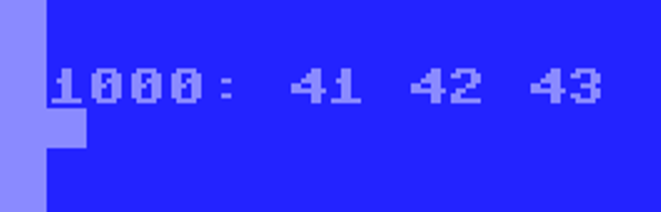
Display memory is a single address (up to 4 hex characters) either by itself, or two addresses separated by a dot for a range of memory. Below we are looking at the C64 jiffy clock by entering "A0.A2". The result is the starting address followed by a colon and three bytes of memory from that range.
Modify memory is similar to the output of display memory, but you enter it. (No I didn't implement the Woz's feature of showing the previous value of the first address. Probably nice to add later.) Either a single byte, or multiple bytes may be entered and stored into memory at the specified address.
Run program is a hex address followed by R. Note that an RTS will usually return to BASIC. And a BRK will perform the normal screen reset routine. So best bet for now is to JMP $C000 to return to the monitor (if you wish). Or if you want to reset the C64...
Those are the commands I stole from WozMon. (To be clear, I didn't steal the code, just the syntax. This is my code.) To continue the excitement of working with WozMon. With the interest of creating something bigger and better. Oh joy, more generic machine language monitor commands. Yes! You guessed it!
Disassemble is similar to the run command, just change to a D
Assemble is where the exciting things start to happen. Use A after an address to start writing your own programs in 6502 assembler.
And look what an exciting program this is! Nearly(*) at the speed of light, it is outputting the first three numerals before restarting the monitor. Wow! I am speechless. (*)I may be too excited about this.
There you have it! An assembler, disassembler, memory display, editing, and running. What else could you ask for?
Program loading and storing?
Oh excuse me, I must be going now. Can't quite hear you. Enjoying the spendor and excitement of new features. Ah, while I bask in the glory of greatness. Let me enjoy this, will you?
Later dudes!
Update 2024-07-14 The project now also builds a ROM image for a bare-bones 6502 system with MC6850 UART. The source code has conditional compilation for portions whether the system is first a Commodore 64 with full screen editing, secondly only using the get key routine terminal style (used as stepping stone to...), and lastly the minimum 6502+6850MC. Also is an option whether to echo keystrokes back to the terminal. The monitor with mini-assembler and disassembler is now available to more easily port to other 6502 systems!
 |
| 6502+MC6850 emulated system debugging its own input line routine |